Tags:
view all tags
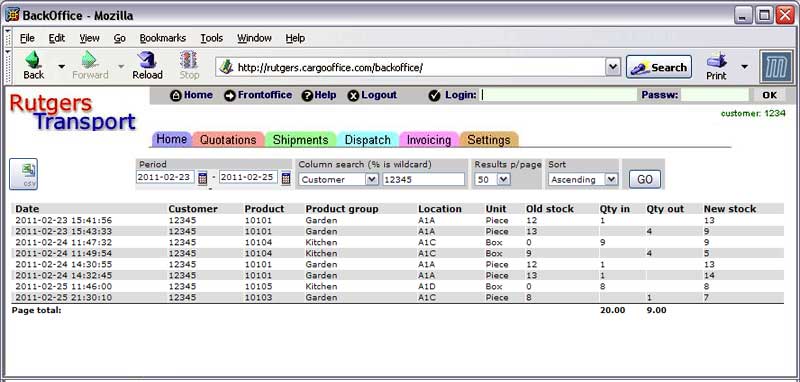
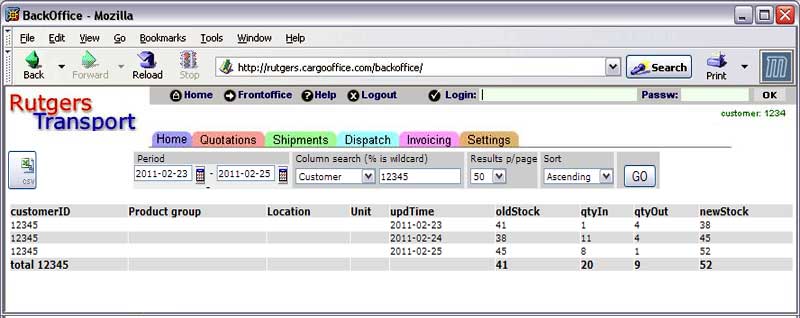
---++ Activity / stock update list The activity list shows a list of stock updates within a specific time frame. You can choose from two types of lists: 1 Activity list, showing all stock updates for each product in a chronological sequence. 1 Collective acitivity list, showing totalised quantities, mostly used for charging. Both functions can be found at: * Backoffice -> Warehouse -> Activity list * Backoffice -> Warehouse -> Collective activity list ---++ Type 1: Activity list This list just shows the stock updates for all products sorted by date and time. <img width="800" alt="whactivity.jpg" src="http://twiki.cargooffice.com/pub/Cargooffice/WhMutList/whactivity.jpg" title="whactivity.jpg" height="382" /> ---++ Type 2: Collective activity list There are several varants of this list depending on the columns you want to see. To make a column visible just click on the header of the column, it changes color to let you know that it is selected. Press 'GO' to run the selection. Below are some examples of the variants of this list. ---+++ Variant 1: Totals per day With no columns selected the list shows you totalized quantities per day. In the example below we selected a specific time period and a specific customer. For each day the following totals are given: * *old stock* (total quantity on stock of all products at the beginning of the day) * *quantity in* (total quantity received) * *quantity out* (total quantity delivered) * *new stock* (total quantity on stock at the end of the day). <img width="800" alt="whactivitycust.jpg" src="http://twiki.cargooffice.com/pub/Cargooffice/WhMutList/whactivitycust.jpg" title="whactivitycust.jpg" height="318" /> ---+++ Variant 2: Totals per Unit With the column 'Unit' selected (click the header to select) the list shows you totalized quantities per unit. In the example below you can see that the list is expanded to show totals per unit. The example only shows the units Piece and Box, in your case it could be Pallets, Containers, Kilogram, Tonne etc. depending on what units you handle in your warehouse. This list yse you chan or Toncould be s anthis case we selected a specific time period and a specific customer. For each day the following totals are given: * *old stock* (total quantity on stock of all products at the beginning of the day) * *quantity in* (total quantity received) * *quantity out* (total quantity delivered) * *new stock* (total quantity on stock at the end of the day).
Attachments
Attachments
Topic attachments
I
Attachment
History
Action
Size
Date
Who
Comment
jpg
1.jpg
r1
manage
0.3 K
2011-02-28 - 13:58
HenkRoelofs
jpg
whactivity.jpg
r1
manage
44.2 K
2011-02-28 - 13:58
HenkRoelofs
jpg
whactivitycust.jpg
r1
manage
36.1 K
2011-03-01 - 13:57
HenkRoelofs
Edit
|
Attach
|
Watch
|
P
rint version
|
H
istory
:
r7
<
r6
<
r5
<
r4
<
r3
|
B
acklinks
|
V
iew topic
|
Raw edit
|
More topic actions...
Topic revision: r5 - 2011-03-01
-
HenkRoelofs
Home
Site map
Cargooffice web
Loginet web
Main web
Sandbox web
TWiki web
Cargooffice Web
Create New Topic
Index
Search
Changes
Notifications
RSS Feed
Statistics
Preferences
P
View
Raw View
Print version
Find backlinks
History
More topic actions
Edit
Raw edit
Attach file or image
Edit topic preference settings
Set new parent
More topic actions
Account
Log In
Register User
Edit
Attach
Copyright © 2008-2025 by the contributing authors. All material on this collaboration platform is the property of the contributing authors.
Ideas, requests, problems regarding TWiki?
Send feedback