Track & Trace System
Introduction
Inside the Track & Trace system shipments can be traced by all different parties involved: manufacturers, planning, staff, management, drivers, customers, clients of customers, recipients, etc.The biggest advantage is a more actual display of shipments curent statuses and less phone calls between involved parties.
All information is visible inside your cargooffice. Every party involved wins time and profit.
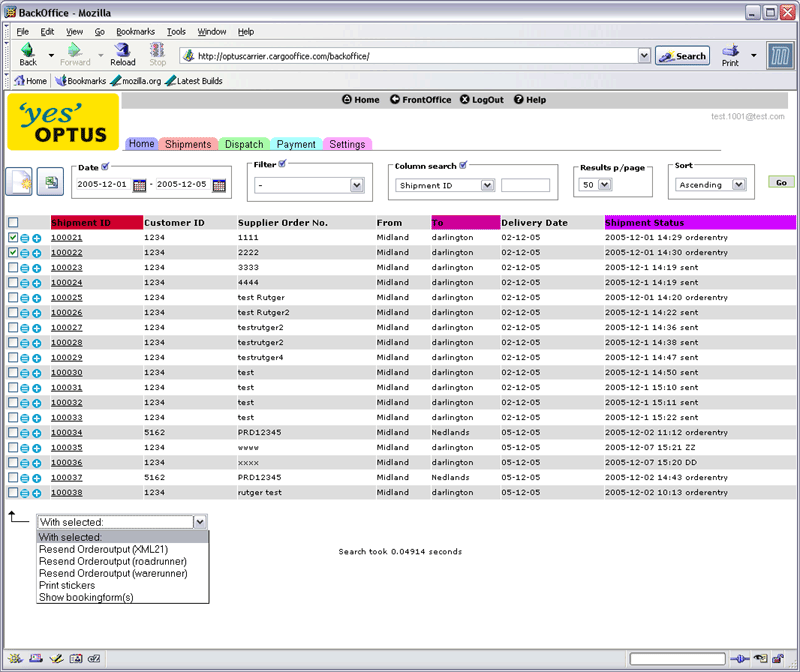
Enlarge
The Track & Trace system gives cargoOffice users the possibility to follow their shipments along its logistical chain.
Changing shipment status are visible inside the Track & Trace screens of your cargoOffice.
Access to track & Trace screens is restricted. Users will only see information about their shipment(s).
Different communication equipment can be used to sent new shipment status to the system: PC's, boardcomputers, handhelds, PDA's, SMS, pocket PC', smartphones, etc.
Documentation
- TracktraceHowto describes how to use the track & trace system (-- RutgerRutgers - 07 Nov 2005)
- SubcontractorDocumentation describes how subcontractors can use Track & Trace (-- RutgerRutgers - 13 Dec 2005)
- TracktraceFilters describes how to use filters inside the Track & Trace System (-- RutgerRutgers - 13 Dec 2005)
- ShipmentStatus describes what is meant by shipment statuses (-- RutgerRutgers - 13 Dec 2005)
- HistorySystem describes what is meant by the history system (-- RutgerRutgers - 19 Dec 2005)
FAQ (Frequently Asked Questions)
Recent Changes
Wish List
-- RutgerRutgers - 16 Mar 2006


| I | Attachment | History | Action | Size | Date | Who | Comment |
|---|---|---|---|---|---|---|---|
 gif gif |
trtrscreen.gif | r1 | manage | 88.3 K | 2006-03-16 - 15:22 | RutgerRutgers | tracktrace sample |
Topic revision: r10 - 2006-03-16 - RutgerRutgers


 Site map
 Cargooffice web

 Create New Topic
 Index
Index Search
 Changes
 Notifications
 RSS Feed
 Statistics
 Preferences
 Account


 |
 |
|
|
|
|

 Copyright © 2008-2025 by the contributing authors. All material on this collaboration platform is the property of the contributing authors.
 Ideas, requests, problems regarding TWiki? Send feedback