Tags:
create new tag
view all tags
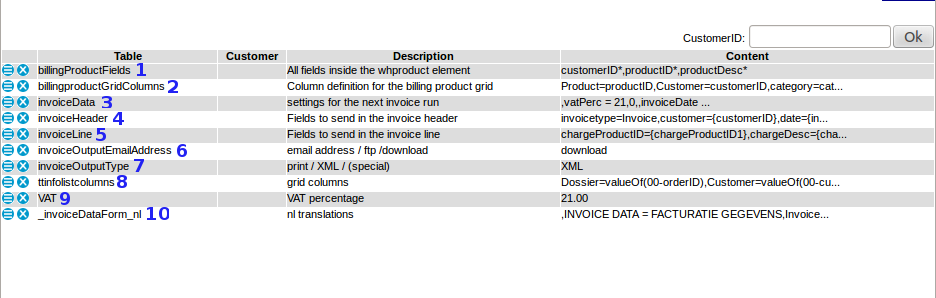
---++ Description of default invoice parameters * Invoice parameters can be found in: Backoffice -> Settings -> Parameters -> Invoicing <A HREF="%ATTACHURL%/parameterinv04.png"><img vspace="10" alt="" src="/pub/Cargooffice/ParametersInvoiceDefault/parameterinv04.png" title="Default invoice parameters (click for enlargement)" border="0" /></A> ---+++ -. billingHistory * Depending on the billing sytem you are using, value shows path to invoice location. ---+++ 1. billingProductsFields * Users are able to edit their billing product fields * Where to find: edit button per product at Backoffice -> Invoicing -> Products ---+++ 2. billingProductGridColumns * Displayed columns of Billing Grid as are found at Backoffice -> Invoicing -> Products ---+++ 3. invoiceData At this moment invoiceData is filled with following sub parameters: * invoiceDate : Date of your invoice.<br /> See : [[InvoiceData][Invoice Data]], default template #1. * nextInvoiceNbr : the next invoice number<br /> The next invoice number could be automatically included at printed invoices, see [[InvoicePrints][Invoice print templates]], default template #2 and [[InvoiceData][Invoice Data]], default template #2. * action<br /> Per invoice you are able to choose concept or permanent, see [[InvoiceData][Invoice Data]], default template #3. * newStatus : new shipment status after 'permanent'<br /> You are able to add a new status after permanent, see [[InvoiceData][Invoice Data]], default template #4. ---+++ 4. invoiceHeader * Header of the invoice output.<br />If you like to test this put:<br /> * parameter invoiceOutputType on value XML * and add your email address in parameter invoiceOutputEmailAddress. ---+++ 5. invoiceLine * Line of the invoice output.<br />If you like to test this put:<br /> * parameter invoiceOutputType on value XML * and add your email address in parameter invoiceOutputEmailAddress. * Feel free to add any field you like to invoiceLine value. * If you are looking for a specific field name, check our [[TransportorderFields][default field names]] or contact us by Bug Tracking. ---+++ 6. invoiceOutputEmailAddress There are several methods of sending invoice output: * email address<br />When you add an email address, the output is sent to this particular email address. * ftp<br />The output can also be sent to an FTP address. If you want to know more about FTP-options, ask your supplier or sent us a message by bug tracking. * download<br />When you choose "download", the invoiceOutputType can be stored on your local computer from which you can open it in another application (browser, spreadsheet, editor, etc). ---+++ 7. invoiceOutputType * print <br />output on the screen * PDF <br />When "PDF" is chosen, the output is generated as a PDF, select a method how to sent it through parameter invoiceOutputEmailAddress * The PDF-invoice is based on a HTML template. * This HTML template can be installed inside your FTP-environment, giving you the opportunity to maintain or edit this template according your wishes. If this option is desired, send Cargo Office programmers a request by using your Report Sytem. * XML <br />When "XML" is chosen, the output is generated as XML. * (special) <br />This option is used for special custom made output programs, contact your supplier for available options or contact us by bug tracking if you like a custom made parser. ---+++ 8. ttinfolistcolumns * Shows all columns which are displayed in [[InvoicedTobe][To be invoiced]]. ---+++ 9. VAT * VAT percentage as shown at the invoice template.<br />VAT percentage is automatically summed inside the default invoice template. * Digits as well as letters are possible values. Letters are used when 'reverse charge' or in dutch 'btw verlegd' is applicable. * Note1: tax law is subject of change. Always check the correct rules and regulations concerning if and how much VAT needs to be charged. * Note2: in most European countries, a reference to the Tax Legislation does not need to be mentioned on the invoice any more, but an indication of 'reverse charge' remains obligatory. Again; be sure to consult legislation in your own country and the country your customer is situated in. ---+++ 10. _invoiceDataForm_nl * Form field name translation into Dutch language -- Main.RutgerRutgers - 20 Aug 2008 / 2013-04-19 / 2015-03-25 / 2015-05-06
Attachments
Attachments
Topic attachments
I
Attachment
History
Action
Size
Date
Who
Comment
gif
parameterinv03.gif
r1
manage
33.3 K
2008-08-20 - 14:51
RutgerRutgers
default parameters
png
parameterinv04.png
r2
r1
manage
46.8 K
2013-04-19 - 12:24
RutgerRutgers
default parameters 2013-04
E
dit
|
A
ttach
|
Watch
|
P
rint version
|
H
istory
: r7
<
r6
<
r5
<
r4
<
r3
|
B
acklinks
|
V
iew topic
|
Ra
w
edit
|
M
ore topic actions
Topic revision: r7 - 2015-05-06
-
RutgerRutgers
Home
Site map
Cargooffice web
Loginet web
Main web
Sandbox web
TWiki web
Cargooffice Web
Create New Topic
Index
Search
Changes
Notifications
RSS Feed
Statistics
Preferences
P
P
P
View
Raw View
Print version
Find backlinks
History
More topic actions
Edit
Raw edit
Attach file or image
Edit topic preference settings
Set new parent
More topic actions
Account
Log In
Register User
E
dit
A
ttach
Copyright © 2008-2025 by the contributing authors. All material on this collaboration platform is the property of the contributing authors.
Ideas, requests, problems regarding TWiki?
Send feedback