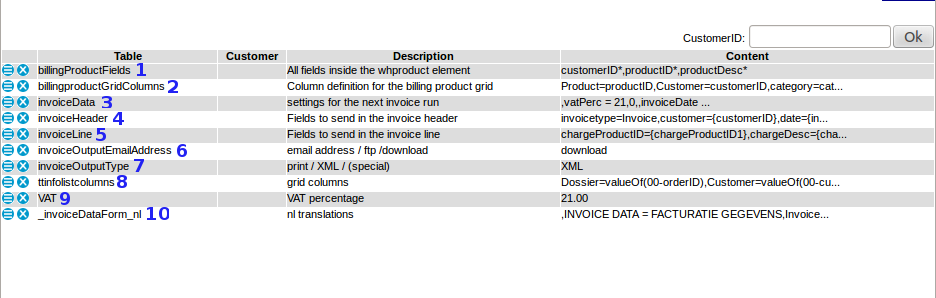
---++ Description of default invoice parameters * Invoice parameters can be found in: Backoffice -> Settings -> Parameters -> Invoicing <A HREF="%ATTACHURL%/parameterinv04.png"><img vspace="10" alt="" src="/pub/Cargooffice/ParametersInvoiceDefault/parameterinv04.png" title="Default invoice parameters (click for enlargement)" border="0" /></A> ---+++ -. billingHistory * Depending on the billing sytem you are using, value shows path to invoice location. ---+++ 1. billingProductsFields * Users are able to edit their billing product fields * Where to find: edit button per product at Backoffice -> Invoicing -> Products ---+++ 2. billingProductGridColumns * Displayed columns of Billing Grid as are found at Backoffice -> Invoicing -> Products ---+++ 3. invoiceData At this moment invoiceData is filled with following sub parameters: * invoiceDate : Date of your invoice.<br /> See : [[InvoiceData][Invoice Data]], default template #1. * nextInvoiceNbr : the next invoice number<br /> The next invoice number could be automatically included at printed invoices, see [[InvoicePrints][Invoice print templates]], default template #2 and [[InvoiceData][Invoice Data]], default template #2. * action<br /> Per invoice you are able to choose concept or permanent, see [[InvoiceData][Invoice Data]], default template #3. * newStatus : new shipment status after 'permanent'<br /> You are able to add a new status after permanent, see [[InvoiceData][Invoice Data]], default template #4. ---+++ 4. invoiceHeader * Header of the invoice output.<br />If you like to test this put:<br /> * parameter invoiceOutputType on value XML * and add your email address in parameter invoiceOutputEmailAddress. ---+++ 5. invoiceLine * Line of the invoice output.<br />If you like to test this put:<br /> * parameter invoiceOutputType on value XML * and add your email address in parameter invoiceOutputEmailAddress. * Feel free to add any field you like to invoiceLine value. * If you are looking for a specific field name, check our [[TransportorderFields][default field names]] or contact us by Bug Tracking. ---+++ 6. invoiceOutputEmailAddress There are several methods of sending invoice output: * email address<br />When you add an email address, the output is sent to this particular email address. * ftp<br />The output can also be sent to an FTP address. If you want to know more about FTP-options, ask your supplier or sent us a message by bug tracking. * download<br />When you choose "download", the invoiceOutputType can be stored on your local computer from which you can open it in another application (browser, spreadsheet, editor, etc). ---+++ 7. invoiceOutputType * print <br />output on the screen * PDF <br />When "PDF" is chosen, the output is generated as a PDF, select a method how to sent it through parameter invoiceOutputEmailAddress * The PDF-invoice is based on a HTML template. * This HTML template can be installed inside your FTP-environment, giving you the opportunity to maintain or edit this template according your wishes. If this option is desired, send Cargo Office programmers a request by using your Report Sytem. * XML <br />When "XML" is chosen, the output is generated as XML. * (special) <br />This option is used for special custom made output programs, contact your supplier for available options or contact us by bug tracking if you like a custom made parser. ---+++ 8. ttinfolistcolumns * Shows all columns which are displayed in [[InvoicedTobe][To be invoiced]]. ---+++ 9. VAT * VAT percentage as shown at the invoice template.<br />VAT percentage is automatically summed inside the default invoice template. * Digits as well as letters are possible values. Letters are used when 'reverse charge' or in dutch 'btw verlegd' is applicable. * Note1: tax law is subject of change. Always check the correct rules and regulations concerning if and how much VAT needs to be charged. * Note2: in most European countries, a reference to the Tax Legislation does not need to be mentioned on the invoice any more, but an indication of 'reverse charge' remains obligatory. Again; be sure to consult legislation in your own country and the country your customer is situated in. ---+++ 10. _invoiceDataForm_nl * Form field name translation into Dutch language -- Main.RutgerRutgers - 20 Aug 2008 / 2013-04-19 / 2015-03-25 / 2015-05-06
Attachments
Attachments
Topic attachments
I
Attachment
History
Action
Size
Date
Who
Comment
gif
parameterinv03.gif
r1
manage
33.3 K
2008-08-20 - 14:51
RutgerRutgers
default parameters
png
parameterinv04.png
r2
r1
manage
46.8 K
2013-04-19 - 12:24
RutgerRutgers
default parameters 2013-04
This topic: Cargooffice
>
AboutFreecargo
>
FreightExchangeHowto
>
WebHome
>
FreecargoProjects
>
BillingInvoicing
>
InvoiceParameters
>
ParametersInvoiceDefault
Topic revision: r7 - 2015-05-06 - RutgerRutgers
Copyright © 2008-2025 by the contributing authors. All material on this collaboration platform is the property of the contributing authors.
Ideas, requests, problems regarding TWiki?
Send feedback